Man-in-the-middle attacks and privacy concerns are driving more and more websites to enable HTTPS as a basic requirement. Starting in 2021, the Chrome browser began loading HTTPS by default, which has helped promote the use of HTTPS across the Internet. In this blog, it will introduce how we implemented HTTPS for our website.
HTTPS implementation principles
The main step in implementing HTTPS is registering a certificate for the web server. In most cases, the certificate needs to be deployed on the frontend load balancer. In our case, we used Nginx.
SSL certificate and deployment
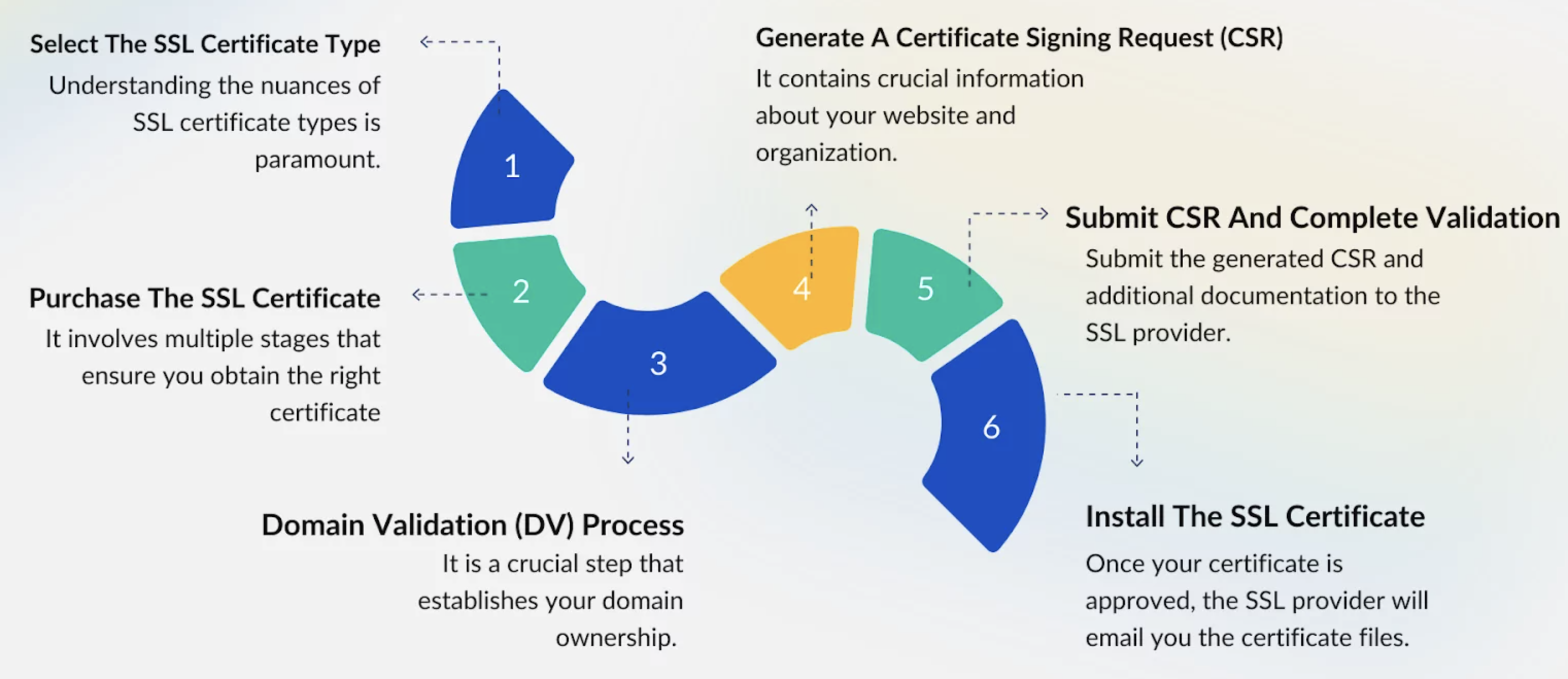
It shows the process of registering a certificate from a CA. At first, we planned to apply for a free “Let’s Encrypt” certificate, but the request was refused because EC2 domains are not supported. Since we did not have a budget to purchase a domain for this assignment project, we decided to use a self-signed certificate instead. Most major browsers support this type of certificate, but they usually show an “invalid CA” warning. This warning can be bypassed, and the site can still be accessed normally. It does not affect the security of HTTPS, but it does lead to inconvenience and a poorer user experience.
Below are the steps to generate a self-signed certificate and deploy it in Nginx:
1. Generate self-signed certificate and private key
# Create a directory to store SSL certificates
mkdir -p /etc/nginx/ssl

# Generate a self-signed certificate (valid for 365 days) and private key
openssl req -x509 -nodes -days 365 \
  -newkey rsa:2048 \
  -keyout /etc/nginx/ssl/selfsigned.key \
  -out /etc/nginx/ssl/selfsigned.crt
2. Generate Diffie-Hellman parameters
# Generate strong Diffie-Hellman parameters
openssl dhparam -out /etc/nginx/ssl/dhparam.pem 2048
3. Configure Nginx to use SSL certificate
# Edit Nginx config file
server {
    listen 443 ssl;
    server_name yourdomain.com;  # Replace with your domain or IP address

    ssl_certificate /etc/nginx/ssl/selfsigned.crt;         # Path to the self-signed certificate
    ssl_certificate_key /etc/nginx/ssl/selfsigned.key;     # Path to the private key
    ssl_dhparam /etc/nginx/ssl/dhparam.pem;                # Optional: Path to Diffie-Hellman parameters

    ssl_protocols TLSv1.2 TLSv1.3;                         # Use secure protocols only
    ssl_ciphers HIGH:!aNULL:!MD5;                          # Use strong ciphers

    location / {
        root /var/www/html;                                # Web root directory
        index index.html index.htm;                        # Default index files
    }
}

# Redirect HTTP traffic to HTTPS
server {
    listen 80;
    server_name yourdomain.com;  # Replace with your domain

    return 301 https://$host$request_uri;  # Force HTTPS redirection
}
4. Check and reload Nginx
# Test the configuration for syntax errors
nginx -t

# Reload Nginx to apply changes
systemctl reload nginx
How HTTPS traffic works
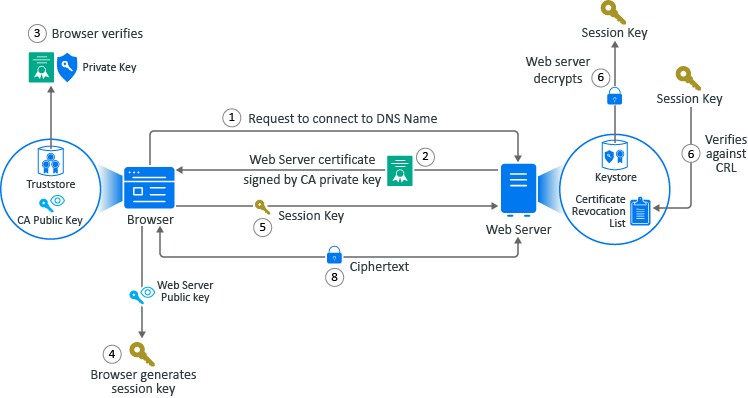
Here is an example that shows what happens when a user browses an HTTPS website.
- The user accesses the HTTPS domain using a browser. The browser sends a request to connect to the fully qualified DNS names of the web server.
- The web servers sends a copy of its server certificate that has been signed by the private key of a well-known CA.
- The browser access the public key of the well-known CA that is stored in the browser’s TrustStore. The browser uses the public key of the well-known CA to decrypt the signature on the web server’s certificate to verify that the certificate is valid.
- The browser generates a session key using the public key in the web server’s certificate.
- The browser sends the newly generated session key back to the web server.
- The web server uses its private key stored in the KeyStore to decrypt the session key.
- The web server verifies that the session key is not on the certificate revocation list (CLR). At this point the secure handshake between the browser and web server is established.
- The web server encrypts the data using the session key and sends the data back in ciphertext to the browser. The browser uses the session key to decrypt the data and then uses the session key to encrypt data and then it sends the data back in ciphertext. This secure communication continues until the session ends.
Some findings and thoughts
- AWS ALB could be a better choice for handling traffic, instead of maintaining a self-hosted Nginx server. It can also manage HTTPS certificates and traffic.
- Browsers allow access to websites with self-signed certificates, but this provides a poorer experience for end users. Custom domain with an SSL certificate would be a better option.
- Many certificate management tasks are not included, such as managing expiration dates and enabling automatic renewal.